Create a Navbar Menu
- Navbars = Site Navigation! AKA your website menu. Navbars can be vertical or horizontal. On this website, I've created a vertical navigation menu.
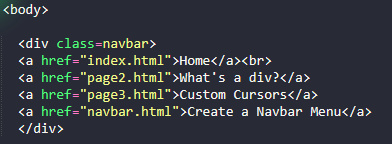
- A navbar is essentially an unordered list, without the numbers or bullet points. In my website here, I've created a div element at the beginning of my body tags, and added all of my page links inside of my div tags.
- If you visit w3Schools and view their CSS Navbar tutorials, you will see it look slightly different because they use the Unordered List synatx:
W3Schools | CSS Navigation Bars - Try creating a horizontal or vertical navbar menu. Remember, this div must live at the top of your body content, and be the same in every webpage (otherwise you will not see your menu). You can adjust the position, colors, text, etc. all in .CSS!
You can download custom cursor packages from this site: sweezy-cursors.com
Make sure you download your cursors as .png or .jpg files! Neocities will not allow you to import a .cur file (a cursor file).